Connect Mastodon
About 1 minute. You'll need: an account on any Mastodon server (Pixelfed, GoToSocial and Akkoma work too).
In Posthuman, open Accounts and pick Mastodon.
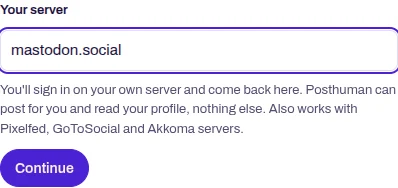
Type your server, like mastodon.social, or your full address, like @you@mastodon.social. Press Continue.
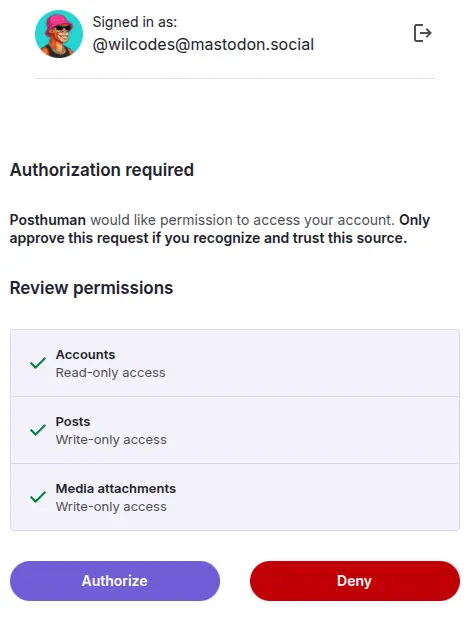
Your server opens. Sign in if it asks, check what Posthuman wants (read your profile, write posts, upload pictures: nothing else) and press Authorize.
You're back in Posthuman, connected.

Good to know
- To cut access, open your server's Authorized apps page (yourserver/oauth/authorized_applications) and revoke Posthuman; it stops at once.
- A second account on the same server: sign out of the first one there (or use another browser) before connecting.
- Mastodon finds posts by hashtag: a couple at the end of a post help people find it.
If something goes wrong
- “That isn't a server address”: Type just the server, like mastodon.social, or your full address, like @you@mastodon.social.
- “Couldn't reach …” or “That server didn't answer”: The server may be busy or down for a moment. Try again in a few minutes.
FAQ
- Does it work if I'm not on mastodon.social?
- Yes: any Mastodon server, and Pixelfed, GoToSocial and Akkoma servers too. Type your own server's address.
- What can Posthuman do on my account?
- Only what the Authorize screen lists: read your profile, write posts and upload pictures. It can't read your messages or follow anyone.
- Can I connect accounts on different servers?
- Yes. Pick Mastodon again and type the other server; each account is its own row.
- How do I disconnect?
- Press the unplug icon on the account's row. To cut it off on the server too, revoke Posthuman on its Authorized apps page.
- What if the connection breaks?
- If the access is revoked, the row shows Reconnect and posts to it wait. Connect again and they go out.
Checked against Mastodon on November 21, 2026. If a screen there looks different, the steps still hold: the buttons may just have moved.