Connect Bluesky
About 2 minutes. You'll need: your Bluesky account, signed in on bsky.app or the app.
In Posthuman, open Accounts and pick Bluesky.
In Bluesky, open App passwords and press Add App Password. Name it Posthuman. Leave “Allow access to your direct messages” off: Posthuman never reads them.
Open App passwords in Bluesky ↗
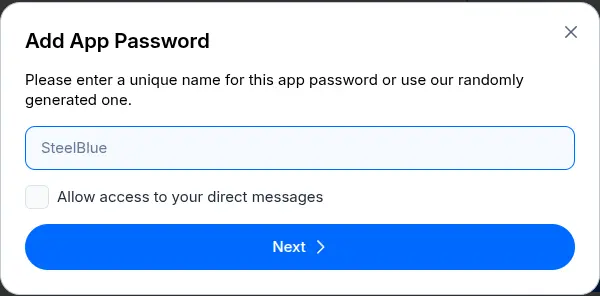
Press Next, then copy the password it shows (it looks like xxxx-xxxx-xxxx-xxxx). Bluesky shows it only once.
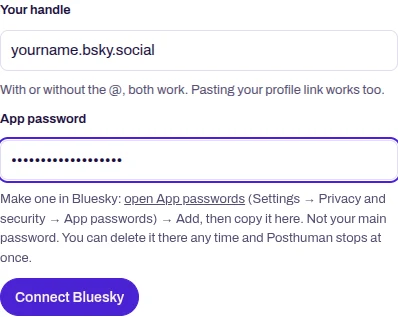
Back in Posthuman, type your handle (with or without the @) and paste the app password. Press Connect Bluesky.
Done: the account shows up with a green dot. It starts with posting times on Mon, Wed and Fri at 9 AM; the pencil changes them.

Good to know
- Never your main password: Posthuman turns one away. An app password can only post, and you can delete it in Bluesky any time; Posthuman stops at once.
- A second Bluesky account? Make an app password on that account too, and connect it the same way.
- Your own domain as a handle (like @you.com) works the same.
If something goes wrong
- “Couldn't find @…”: Check the spelling of the handle. Pasting your profile link works too.
- “Bluesky didn't accept that handle and app password”: Make a new app password and paste it fresh; one copied with a missing letter is the usual cause.
- “That looks like your main Bluesky password”: Make an app password as in step 2 and use that instead.
FAQ
- Why an app password and not my password?
- An app password can post but can't change your account, and you can delete it on its own without changing your real password. Posthuman won't take your main password at all.
- Should I allow access to direct messages?
- No. Posthuman only posts, so leave that box off when you make the app password.
- Can Posthuman see my likes and replies?
- It reads each post's numbers (likes, reposts, replies) for your insights. It never likes, follows or replies for you.
- How do I disconnect?
- Press the unplug icon on the account's row in Posthuman. To cut it off on Bluesky's side too: Settings → Privacy and security → App passwords → delete the one you made for Posthuman.
- What if the connection stops working?
- The row shows Reconnect and posts to that account wait instead of failing. Make a new app password and connect again; the waiting posts go out.
Checked against Bluesky on November 21, 2026. If a screen there looks different, the steps still hold: the buttons may just have moved.